
New York Magazine
Vox Media EngineeringNews & Magazines
4.015.00 Reviews
- Version
- 1.0.37
- Installs
- 10.00K
- Age Rating
- Teen
Screenshots
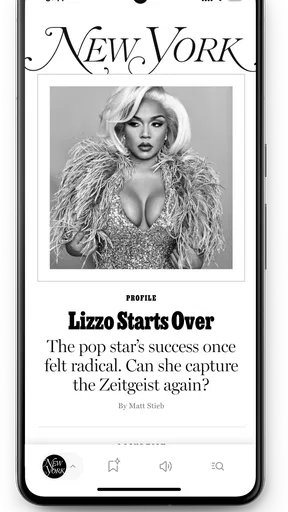
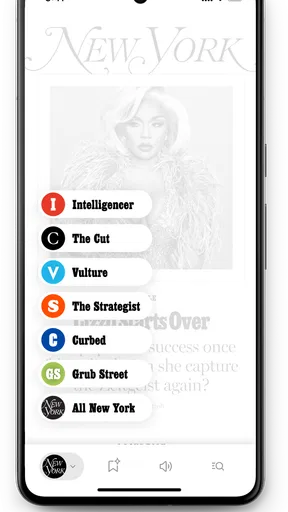

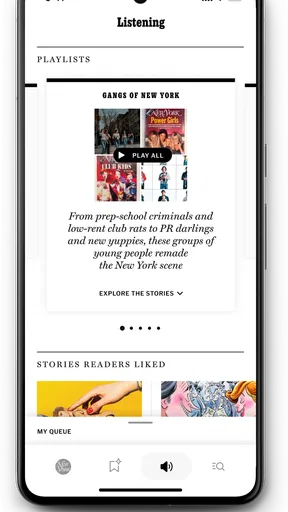
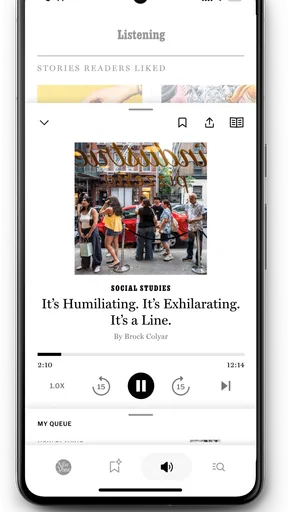
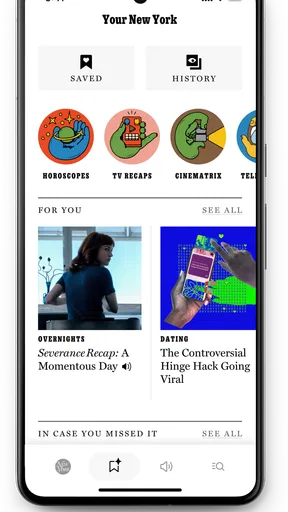
Our Review of New York Magazine
 Analysis by Appyee
I approached New York Magazine as a reader looking for a focused way to keep up with the magazine on a phone, rather than as a replacement for every news source I already use. That distinction matters. This is a free News & Magazines app from Vox Media Engineering, released on February 4, 2025, and its appeal is closely tied to how comfortably you can read while connected to the internet.
My overall impression is that it makes the most sense for people who already enjoy New York Magazine’s mix of reported stories, criticism, culture, politics, and city-focused writing. It gives that publication a dedicated place on a mobile device, which feels more intentional than repeatedly searching for articles in a browser. At the same time, I would not install it expecting a universal breaking-news dashboard or a broad replacement for an RSS reader. Its value comes from the magazine’s editorial identity and the convenience of having that reading experience gathered into an app.
How the app feels when your connection is doing the work
The biggest practical question is not simply whether the app opens. It is how much of the experience depends on a reliable connection. In normal use, a news app is constantly asking the network to deliver fresh headlines, article pages, images, and updates. That makes connectivity part of the reading experience rather than an invisible technical detail.
When I have a stable connection, the app is easiest to appreciate as a quick entry point into the publication. I can open it with a clear intention—checking what is new, finding something to read during a break, or following a subject that has caught my attention—and move from browsing into reading without first navigating a general search page. That small reduction in friction is useful on a phone, where every extra step feels more noticeable.
The trade-off is that a dedicated app cannot remove the basic limits of mobile networks. If the signal is weak, articles and visual elements may take longer to appear, and the smoothness of browsing can change from one location to another. I would avoid judging the app solely by what happens in a basement, on a crowded train, or in a building with poor reception. Those situations reveal the app’s dependence on connectivity, but they also reveal whether my reading habits are realistic for a live publication.
For me, the best connected moments are short sessions with a definite purpose. I might scan the latest selection over coffee, open one story before an appointment, then return later to read a different piece. That pattern suits a magazine app better than leaving it open all day as a constantly updating stream. The experience feels more deliberate when I treat it as a place to choose reading, not as a background alarm for every new event.
What changes between browsing and actually reading
Browsing and reading place different demands on a phone. Browsing is more sensitive to loading delays because I am moving between choices and deciding what deserves attention. Reading is more forgiving once the article has appeared, although interruptions can still break concentration. I found that the app’s usefulness depends on making that transition quickly enough for a spare moment to become a real reading session.
This is also where the publication itself matters. A general news aggregator may offer more sources in one screen, but it can feel noisy and repetitive. Here, the narrower editorial destination is the advantage. I am not choosing between an endless list of unrelated publishers; I am entering one recognizable magazine environment. The limitation is obvious too: if I want local updates, international coverage, sports, weather, and several viewpoints at once, another app will be more efficient.
A practical tip is to open the app when I have enough time to read at least one complete article, rather than checking it every few minutes out of habit. That approach reduces the temptation to judge the service by headline turnover alone. It also makes the app’s magazine character clearer: the point is not only speed, but finding pieces worth giving attention.
Using it in real mobile situations
On a phone, context changes what I expect. At home on Wi-Fi, I can browse comfortably and take my time. Outside, I am more likely to use it in short bursts, with one hand, while waiting or commuting. The app is therefore most useful when I already know what kind of session I want: a quick scan, a single article, or a longer break from other tasks.
One realistic scenario is a weekday lunch break. I have only a limited window, so I open the app, look through the available stories, and choose one that matches my mood rather than trying to process everything. If the connection is strong, that workflow feels natural. If I am moving through a patchy signal area, I would rather wait until I am settled than repeatedly tap through pages that may not load cleanly.
Another scenario is evening reading at home. The larger advantage there is not mobility itself but separation. A dedicated app gives me a clear place for the magazine instead of mixing its articles with browser tabs, social posts, and unrelated notifications. That separation can help me remember what I intended to read. It does not guarantee focus—my phone can still interrupt me—but it makes the reading destination easier to return to.
I would be more cautious about using it as my only travel companion. If I am boarding a flight, entering an area with unreliable reception, or planning to read where connectivity is uncertain, I prefer a service whose offline behavior is clearly part of my established routine. I would not assume that a page I saw earlier will remain available in every disconnected situation. For this app, my safer habit is to use it while connected and not build an important reading plan around uncertain access.
Screen size also affects the experience. A phone is ideal for quick discovery and individual articles, but long-form reading can become tiring if I am already dealing with glare, movement, or a crowded environment. That is not a flaw unique to this application, yet it influences whether the app feels convenient. For extended sessions, I would choose a quiet place and a comfortable display setting rather than expecting the app to solve every physical limitation of mobile reading.
Who gets the most from the mobile format
The strongest audience is a reader who wants New York Magazine close at hand and values a publication-specific experience. It is especially suitable for people who like returning to a familiar editorial voice instead of building every session from a mixed news feed. The free price also makes trying it straightforward, so I can test whether its reading rhythm fits me without making an immediate purchase decision.
I would skip it as a primary choice if my priority is maximum breadth from one screen. A general aggregator is better for comparing many publications quickly. An RSS reader is better for users who have already built a precise list of sources. A browser may be better for someone who reads only an occasional article and does not want another app on the phone. The dedicated format is worthwhile when the publication itself is the reason I am opening it.
The Teen content rating is another useful signal for deciding where it belongs in a household. I would treat it as an app for teenage and adult readers, not as a child-oriented news space. That does not replace my own judgment about individual articles, but it helps set the right expectation for the publication’s subject matter and tone.
What happens when the connection fails
Connectivity problems are where I become most cautious. A news application can feel excellent when every request completes quickly and suddenly feel unreliable when the network drops at the wrong moment. The important question for me is not whether a failure ever occurs, but whether my workflow can recover without frustration.
If a page stalls, my first response is to stop tapping repeatedly. Multiple attempts can make it harder to tell whether the problem is the app, the network, or a temporary delay. I check whether other connected services are responding, then retry once I have a stronger signal. That simple habit is more effective than treating every loading pause as an application failure.
I also separate two situations: a slow connection and a completely unavailable one. With a slow connection, patience may be enough to continue. With no connection, I do not keep rebuilding the same session. I switch to something already available on my device and return to the app later. That is why I see this as a connected reading tool rather than a guaranteed companion for every dead zone.
Recovery is easier when I remember what I intended to read. If I opened the app for a particular topic, I can search for it again or revisit the relevant area once the connection returns. If I was simply browsing, I accept that the session may need to start over. This is a small but meaningful trade-off: purposeful use is more resilient than aimless scrolling because I have a clear next action after an interruption.
Keeping expectations realistic on unstable networks
I would not measure the app’s quality by a single failed load. Mobile networks vary too much for that to be fair. Instead, I look at whether the app remains useful across ordinary conditions: home Wi-Fi, a dependable cellular connection, and occasional weak coverage. The app earns its place when most of my normal sessions are easy enough that I stop thinking about the network.
There is also a psychological side to failure. If I expect a continuously updated feed, every delay feels like missing information. If I expect a magazine reading session, a delay is inconvenient but less urgent. That difference changes how I experience the same technical limitation. My recommendation is to use it for intentional reading and not depend on it as an emergency source during a connectivity problem.
Using less data without losing the point
News apps can consume more mobile data than users expect because reading is not limited to text. Images and repeated browsing sessions add up, especially when I open the app out of habit and move through many stories without finishing any. Even without tracking exact usage, I can make the experience more data-conscious by changing when and how I browse.
My first tip is to use Wi-Fi for exploratory sessions. When I am only checking one specific story, cellular use is easier to justify because the session has a defined purpose. When I am browsing broadly, I wait until I have a dependable Wi-Fi connection. This is a better compromise than avoiding the app entirely, since it preserves the convenience of mobile reading while reducing unnecessary background-style browsing.
A second tip is to choose articles before settling into a longer session. I scan the available choices, select one or two, and then read them rather than opening every headline. This saves data and attention at the same time. It also makes the app feel less like an endless feed and more like an editorial selection that I am actively curating for myself.
A third tip is to avoid refreshing simply because I am bored. Refreshing can be tempting in a news environment, but it rarely improves a short reading break. If I have already checked the app recently, I would rather finish the article I opened or leave and return later. That habit is particularly helpful on limited mobile plans, where repeated browsing is less valuable than a focused session.
Users who are very strict about data should compare this experience with a text-first news workflow. A browser configured around lightweight reading, or a carefully managed feed reader, may suit them better. The dedicated app’s benefit is the connection to New York Magazine’s presentation and editorial home; the cost is that a richer magazine experience may be less economical than consuming only plain headlines and text.
Version, trust, and the decision to keep it installed
The app is currently at version 1.0.37, which tells me I should keep an eye on how the experience develops rather than assuming every rough edge is permanent. It was released on February 4, 2025, so it is still a relatively new arrival in its current app form. That makes regular updates important for users who care about stability, especially when their reading depends on smooth loading and dependable recovery.
Its early audience is still modest, with more than ten thousand installs, and the average rating is 4.0 from roughly forty ratings. I read those figures as a reason to form my own view rather than treating the rating as a final verdict. The app has enough public use to show that people are trying it, but not enough scale for a single number to explain every device, network, or reading habit.
The developer is Vox Media Engineering, a detail I associate with the app’s role as a maintained publication product rather than a one-off reader. Still, developer identity does not remove the need to test the basics on my own phone. I would install it, open several sections while connected, try both Wi-Fi and cellular data, and then decide whether the loading behavior fits my routine.
The free price lowers the risk of that experiment. I can judge the app on usefulness, connectivity, and reading comfort without first weighing a subscription charge. That does not mean it will replace every other news tool I use. It simply makes it easier to give the dedicated experience a fair trial and keep it only if I actually return to it.
My connectivity verdict
I recommend New York Magazine to readers who want a focused mobile doorway into this particular publication and who usually have a reliable internet connection when they read. Its strongest quality is not unlimited coverage; it is the combination of a recognizable editorial destination and the convenience of opening it directly on a phone. For short breaks, intentional article reading, and keeping one magazine separate from a noisy general feed, that is a convincing reason to install it.
I would not choose it as my only news source, my guaranteed travel reader, or my solution for weak-signal environments. A broad aggregator wins for variety, an RSS reader wins for control, and a browser wins for occasional visits. Those alternatives are better when connectivity is uncertain or when I need many publishers in one place.
My final advice is to test it in the conditions that matter to you. Open it on your everyday network, try a short cellular session, and notice whether you naturally find something worth reading. If the app turns spare moments into focused New York Magazine reading, it deserves a place on your phone. If you mainly need fast, wide-ranging updates or dependable access away from a network, I would keep a different tool alongside it—or choose that tool instead.
Verdict
Strengths of New York Magazine
- Covers New York culture, politics, dining, and entertainment in one app.
- Articles are generally polished, well researched, and engaging to read.
- Useful recommendations for restaurants, events, shops, and local experiences.
- Clean interface makes browsing sections and saving stories straightforward.
- Regular updates help readers keep up with fast-moving city news and trends.
Limitations of New York Magazine
- Many premium articles require a subscription after the introductory access period.
- Some content is highly New York-focused and may feel less relevant elsewhere.
- The app may promote newsletters or subscription offers during browsing.
- Certain features depend on a stable internet connection for loading content.
- Opinion-driven coverage may not appeal to readers seeking strictly neutral reporting.
Similar Picks in This Category
View All
Google News - Daily Headlines
Google LLC4.0

X
X Corp.4.8

Flipboard:Your Social Magazine
Flipboard3.4

Opera News: breaking & local
Opera4.5

Hindi News by Dainik Bhaskar
Dainik Bhaskar Group4.0

Way2News Daily News App
Way2News ( Formerly Way2SMS )4.6
Frequently Asked Questions
What is New York Magazine, and what can I read in the app?
New York Magazine is a digital publication covering New York culture, politics, entertainment, food, fashion, technology, and national news. After installing the app, readers can browse the latest articles, opinion pieces, guides, and magazine content in a mobile-friendly format. The exact sections and available stories may change as the publication updates its editorial lineup.
Is the New York Magazine app free to download and use?
The app is generally free to download, but access to all articles and premium features may require a subscription. Some stories can be available without payment, while other content may be limited by a digital paywall. Before subscribing, check the current pricing, trial terms, renewal conditions, and whether your preferred articles are included in the selected plan.
Does New York Magazine offer subscriptions through the app?
Yes, the app may provide subscription options for readers who want broader or unlimited access to New York Magazine content. Subscription plans, prices, introductory offers, and billing methods can vary by platform and region. Users should carefully review the subscription screen before confirming, especially the automatic renewal policy and the steps required to cancel.
Can I read New York Magazine articles offline?
Offline reading availability can depend on the app version, subscription type, and the specific content being viewed. Some magazine or article features may support saving content for later, while other pages require an active internet connection. If offline access is important to you, check the app’s current feature description and test downloading an issue or article after signing in.
What devices and permissions are required to use the New York Magazine app?
New York Magazine is designed for supported Android and iOS smartphones or tablets, although compatibility depends on the operating system version and the app release. The application may request internet access, notifications, and account-related permissions to deliver articles and subscription services. Review the store listing and permission prompts before installation, particularly if you prefer to limit notifications or tracking.
